Your whole lot on Marketplace, in minutes.
Lotswift syncs your inventory and fills every listing for you: photos, details and a written description. Your team reviews it and clicks Publish.
- A person publishes every listing
- Works with DealerCenter and inventory feeds
- ~30 sec
- to fill a listing
- 0
- details retyped
- 2-step
- sold-car check
- 1 person
- reviews every listing
- Built for independent dealerships
- Works with DealerCenter and inventory feeds
- Runs in Chrome, nothing to install
Everything between your lot and a live listing
Stop retyping vehicle details and hunting for photos. Lotswift handles the busywork so your team spends its time with buyers.
Inventory that keeps itself current
New arrivals, price drops and sold cars come straight from your website or inventory feed, and stay up to date on their own while your team works.
Listings filled in one click
Year, make, model, mileage, price, colors, body style, fuel and every photo, entered into the Marketplace form for you.
Descriptions written for you
A clear, buyer-friendly description for every car, built from its real details. Edit it in a click before posting.
Sold-car alerts you can trust
When a car leaves your inventory, Lotswift double-checks on the next sync, then tells whoever posted it to take the listing down. No false alarms from one bad sync.
Price-change alerts
Drop a price in your system and Lotswift flags every live listing that still shows the old one.
Stale listings refreshed
A listing up for 10 days without a sale gets a nudge: a new cover photo, a fresh description or a price change, so it keeps reaching buyers.
A dashboard for the owner
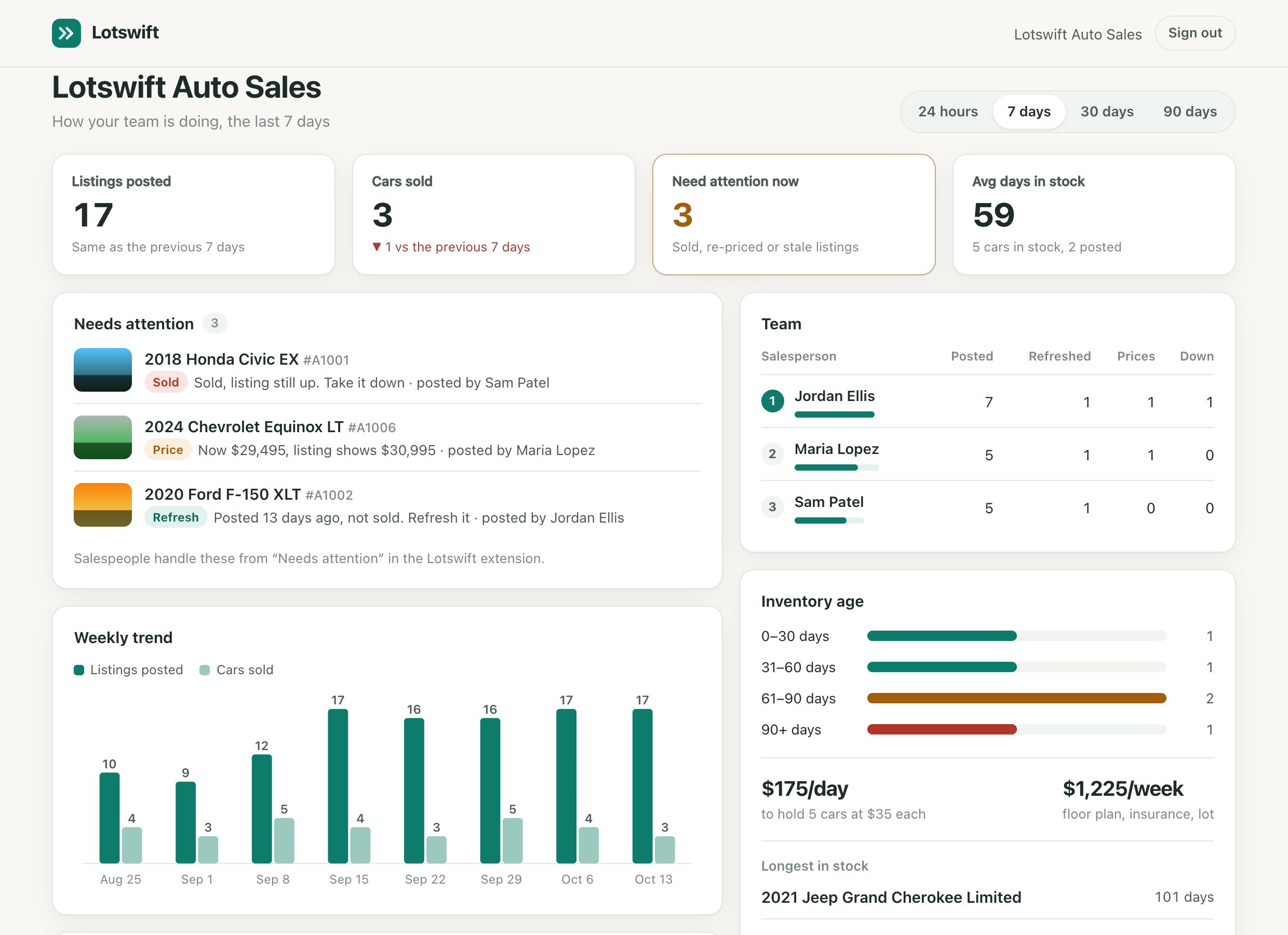
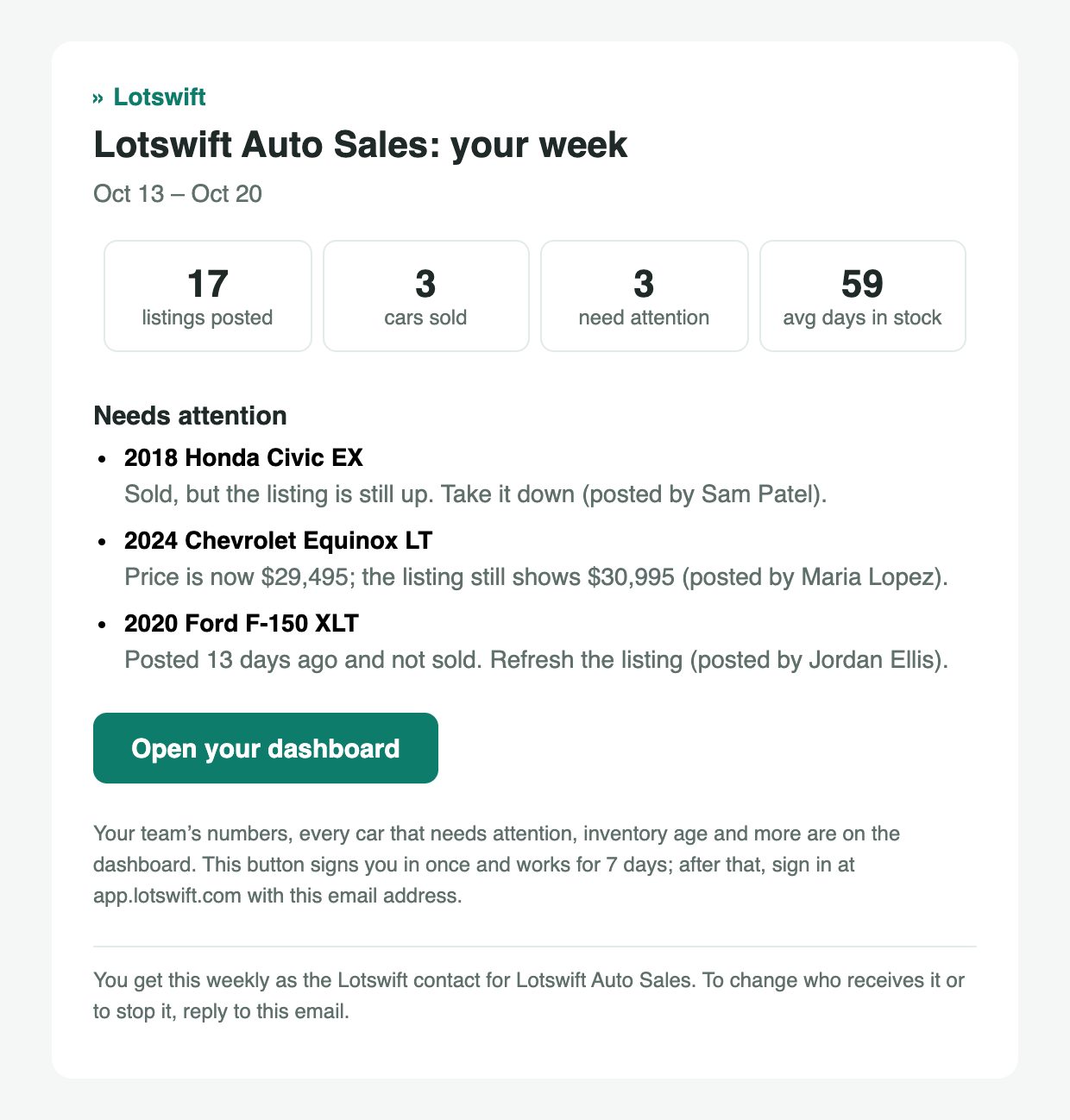
Listings posted and cars sold by week, a team leaderboard, and everything that needs attention, on any device. Plus a short summary in your inbox every Monday.
See the dashboard →Inventory age and holding cost
See how long every car has been on the lot, which ones haven't been posted yet, and what aging inventory costs you each day.
Your team stays in control
Every listing is reviewed and published by a person, at a normal pace. No bots posting on your accounts.
From your lot to a live listing
Five steps, about 30 seconds a car. Your team does the last click; Lotswift does the rest.
-
01
Connect your inventory
We connect your dealership website or inventory feed once. Every car in stock shows up in the Lotswift panel, and new arrivals, price drops and sold cars keep flowing in on their own.
-
02
Pick a car
Open Marketplace's vehicle form and the panel opens beside it. The cars that have waited longest are at the top, with photos, details and a written description ready to go.
-
03
Fill the listing
One click enters year, make, model, mileage, price, colors, body style, fuel, the description and every photo into the form. No retyping, no hunting for pictures.
-
04
Review and publish
Your salesperson checks the listing and clicks Publish. Lotswift notices, asks to confirm, and records who posted which car and when.
-
05
Stay on top
Sold cars still listed, listings showing an old price and listings due for a refresh land in Needs attention. Owners see it all on the dashboard and in a Monday email.
Know what needs attention, before a buyer does
Marketplace listings go stale fast. Lotswift keeps a running to-do list so nothing slips.
- To post: every car in stock that isn't on Marketplace yet.
- Needs attention: sold cars still listed, listings with an old price, and listings due for a refresh.
- Posted: what's live, who posted it and when.
- Oldest first: cars that have waited longest are at the top of To post, with days in stock.
- Shared with the team: everyone at the dealership sees the same list.
Needs attention · 4
Your whole lot and your whole team, at a glance
Owners sign in with their email, no password needed, and see what got posted, what sold, who's keeping up and what needs attention today.
Join the dealer pilot
We're onboarding a small group of independent dealerships. We set everything up with you and keep pricing simple: one plan per dealership, with your whole sales team included.
Questions dealers ask
Does Lotswift post listings automatically?
No, and that's on purpose. Lotswift fills in the listing, and a person on your team reviews it and clicks Publish. Keeping a person on every listing is the safest way to use Marketplace with your business accounts.
Which inventory systems does it work with?
Lotswift reads DealerCenter dealership websites today, and imports standard inventory feeds (CSV, XML or JSON) from most dealer systems. Using something else? Email us and we'll check.
What do my salespeople need?
Google Chrome on a Windows or Mac computer, a Facebook account, and the Lotswift extension. Each salesperson gets their own access, so you can see who posted what.
What happens when a car sells?
When a car disappears from your inventory, Lotswift checks again on the next sync to rule out a website hiccup. If it's still gone, its listing moves to "Needs attention" so your team can take it down on Marketplace and confirm it's done.
Can I see how my team is doing?
Yes. The owner's dashboard shows listings posted and cars sold by week, a leaderboard of who posted, refreshed and updated what, every listing that needs attention, and how long cars have been in stock. You also get a short summary by email every Monday.
Do salespeople see each other's numbers?
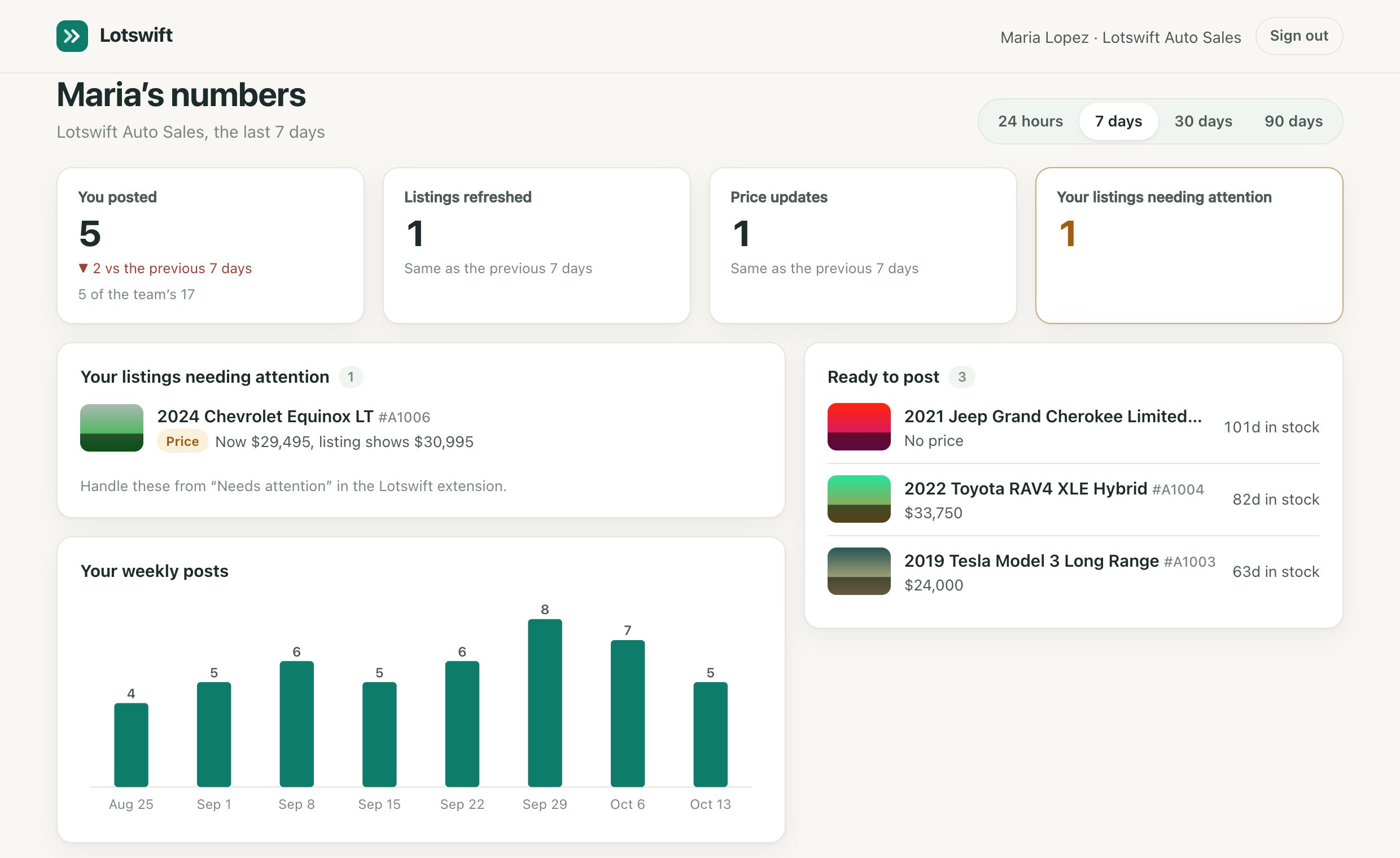
No. Each salesperson sees only their own numbers and the team's total. The full leaderboard is for owners.
Does Lotswift see my Facebook account or messages?
No. Lotswift never reads your Facebook messages, contacts or account details, and never stores your Facebook password. It only fills in the listing form your salesperson opens. See our privacy policy.
How much does it cost?
One plan per dealership, with your sales team included. Pilot dealerships get early pricing; book a demo and we'll walk you through it.